📌 Key Takeaways
- Start with proper planning: Validate your app idea, understand your target audience, and define clear business requirements.
- Choose the right technology: Select iOS, Android, Flutter, or React Native based on your app’s features, budget, and performance needs.
- Focus on MVP and UI/UX: Prioritize essential features and create a simple, user-friendly design before adding advanced functionality.
- Test before launch: Perform functional, security, performance, and compatibility testing to ensure a smooth user experience.
- Keep improving after launch: Regular updates, maintenance, performance monitoring, and user feedback help your app remain secure and relevant.
Introduction
Developing a successful mobile application involves much more than writing code. It requires a structured process that transforms a business idea into a functional, secure, and user-friendly digital product. From market research and requirement analysis to UI/UX design, development, testing, deployment, and maintenance, every stage contributes to the application’s long-term success.
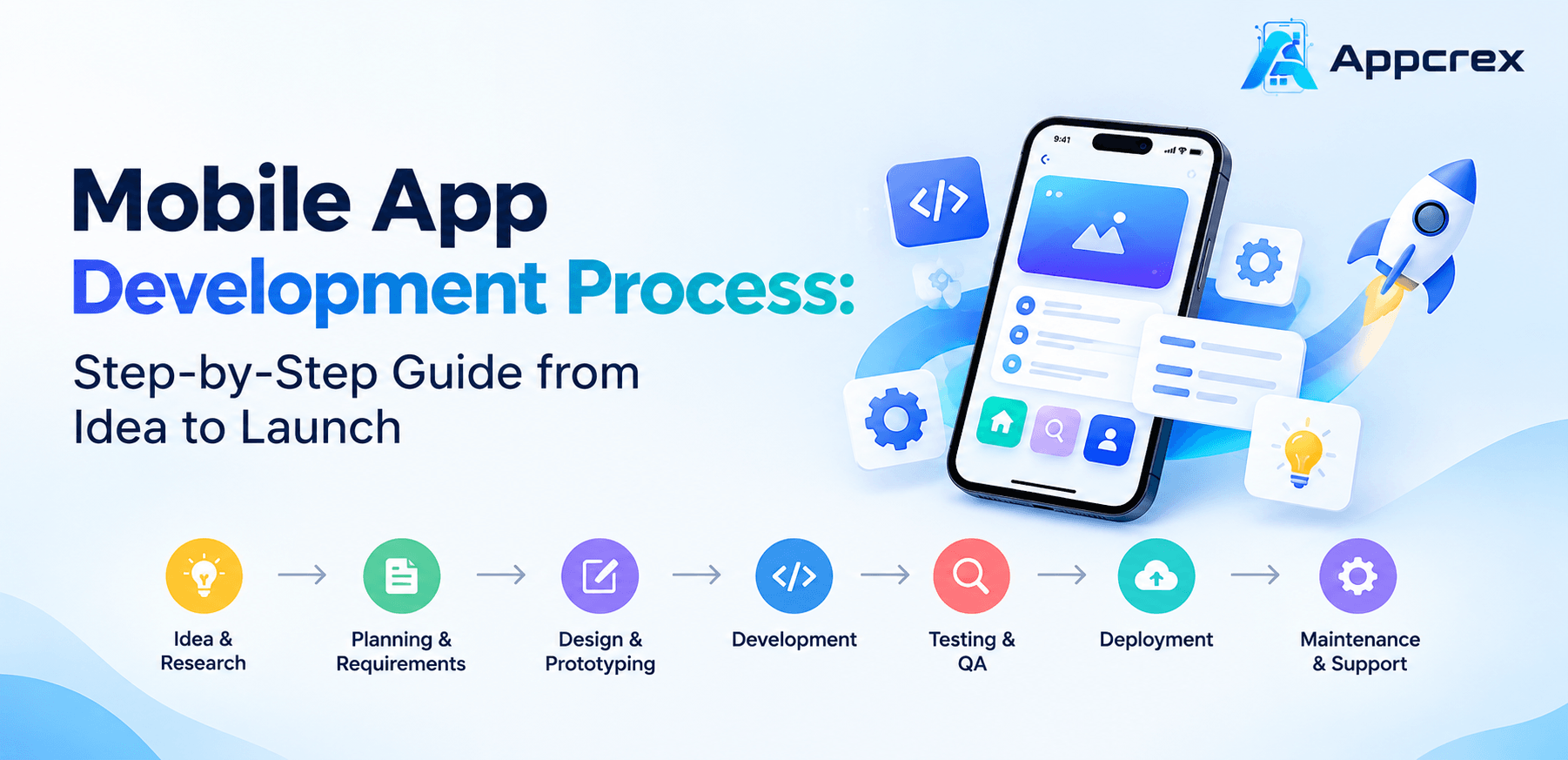
The mobile app development process typically includes 10 major stages: idea validation, requirement gathering, feature planning, platform selection, UI/UX design, technical architecture, app development, integration, testing, and deployment. After launch, continuous monitoring and maintenance help keep the application secure, reliable, and relevant to users.
Whether you are a startup founder planning your first app or an established business looking to improve customer experiences, understanding these stages can help you manage development costs, reduce risks, and make better technical decisions.
This guide explains the complete mobile app development lifecycle, what happens at each stage, what businesses should expect from their development teams, and how to prepare for a successful app launch.
What Is the Mobile App Development Process?
The mobile app development process is a structured workflow used to plan, design, build, test, launch, and maintain a mobile application. It combines business analysis, product strategy, interface design, software engineering, quality assurance, and ongoing optimization.
The process starts by identifying a business problem or user requirement. Developers and product teams then define the application’s purpose, target audience, features, technology stack, and development roadmap.
A typical mobile application project follows this workflow:
- Idea validation and market research
- Requirement gathering and business analysis
- Feature planning and MVP definition
- Platform and technology selection
- UI/UX design and prototyping
- Technical architecture and database planning
- Frontend and backend development
- API and third-party integrations
- Testing and quality assurance
- Deployment and post-launch maintenance
The exact workflow may vary depending on application complexity, business requirements, integrations, security needs, and development methodology.
Mobile App Development Process at a Glance
| Development stage | Main activities | Expected deliverable |
|---|---|---|
| Idea validation | Market research, competitor analysis | Validated app concept |
| Requirement analysis | Business goals, user requirements | Project requirements document |
| Feature planning | Feature prioritization, MVP scope | Feature list and roadmap |
| Platform selection | iOS, Android, cross-platform evaluation | Technology recommendation |
| UI/UX design | Wireframes, prototypes, interface design | Approved design prototype |
| Architecture planning | Backend, database, APIs, security | Technical architecture |
| Development | Frontend and backend coding | Working application |
| Integration | Payment, maps, authentication, APIs | Connected app ecosystem |
| Testing | Functional, security, performance testing | Tested release candidate |
| Deployment | Store submission and release | Published application |
| Maintenance | Monitoring, updates, optimization | Ongoing product improvements |
Step 1: Idea Validation and Market Research
Every successful mobile application starts with a clear understanding of the problem it intends to solve. Before investing in design and development, businesses should validate whether their app idea addresses a real user need.
An interesting idea does not automatically become a successful product. Market research helps determine whether potential customers need the application, how competitors are solving similar problems, and what could make the proposed product different.
Key activities during idea validation
Identify the business problem: Define the specific challenge your application will solve. For example, a grocery delivery app may help customers order daily essentials without visiting physical stores.
Understand the target audience: Identify potential users, their expectations, preferences, locations, and common difficulties.
Analyze competitors: Study competing applications to understand their features, pricing models, customer feedback, strengths, and weaknesses.
Evaluate market demand: Research relevant industry trends and customer needs. Interviews, surveys, landing pages, and prototype feedback can help validate demand.
Define the value proposition: Explain why users should choose your application instead of an existing alternative.
Deliverable
The primary output of this stage is a validated app concept supported by initial market research, target audience insights, competitor analysis, and a clear value proposition.
Step 2: Requirement Gathering and Business Analysis
Once the idea has been validated, the next step is to translate the business concept into clear development requirements.
Requirement gathering helps the development team understand what the application should do, who will use it, and how different components should work together.
A business analyst or product manager may work with stakeholders to document functional and non-functional requirements.
Functional requirements
Functional requirements describe the application’s features and expected behavior.
Examples include:
- User registration and login
- User profile management
- Product or service browsing
- Search and filtering
- Online payments
- Booking and scheduling
- Push notifications
- Order tracking
- Admin dashboard
- Reports and analytics
The requirements depend on the application’s business model. A healthcare application, for example, may need appointment scheduling and secure patient communication, while an ecommerce application requires product catalogs, shopping carts, payments, and order management.
Non-functional requirements
Non-functional requirements define how well the application should perform.
They may include:
- Application speed and responsiveness
- Data security and privacy
- Scalability
- Availability and reliability
- Accessibility
- Compatibility across devices
- Backup and recovery
- Regulatory and compliance requirements
Deliverable
The development team prepares a Software Requirements Specification (SRS) or an equivalent product requirements document. It outlines the application scope, user roles, functionality, technical expectations, and project constraints.
A clear requirement document reduces misunderstandings and helps prevent unexpected changes during development.
Step 3: Define App Features and MVP Scope
Not every feature needs to be included in the first version of an application. Building too many features before validating the product can increase development costs and delay launch.
This is why businesses should define a Minimum Viable Product (MVP).
An MVP is an initial version of an application that includes the essential functionality needed to solve the primary user problem. It allows businesses to launch sooner, collect feedback, and improve the product based on real usage.
How to prioritize mobile app features?
A practical approach is to divide features into three categories:
Must-have features: Essential functionality required for the app to work. Examples include registration, login, core services, and payments where relevant.
Should-have features: Useful features that improve the experience but are not essential for the initial launch.
Future features: Advanced functionality that can be introduced after evaluating user feedback and business performance.
For example, an MVP for a food delivery application may include:
- Customer registration
- Restaurant listing
- Menu browsing
- Shopping cart
- Order placement
- Payment integration
- Order status updates
- Basic admin management
Features such as AI-based recommendations, loyalty programs, advanced analytics, and subscription plans can be introduced in later releases if they support the business strategy.
Deliverable
A prioritized feature list, MVP scope, product roadmap, and initial release plan.
Step 4: Choose the Right App Development Platform
Platform selection is an important technical and business decision. Businesses must decide whether to develop an application for iOS, Android, or both platforms.
The right choice depends on the target audience, budget, performance requirements, development timeline, and future product plans.
Native iOS app development
Native iOS applications are developed specifically for Apple’s ecosystem, usually using Swift and Apple’s development tools.
Native iOS development is suitable for businesses that want to target iPhone and iPad users and need close integration with Apple platform capabilities.
Native Android app development
Native Android applications are generally developed using Kotlin or Java.
Android development is suitable for businesses targeting Android users across different device manufacturers, screen sizes, and hardware configurations.
Cross-platform app development
Cross-platform development allows businesses to build applications for multiple operating systems using a shared codebase.
Popular technologies include Flutter and React Native.
Flutter: Uses Dart and provides a framework for building applications with a consistent interface across platforms.
React Native: Uses JavaScript or TypeScript with React concepts to build mobile applications for iOS and Android.
Native vs. cross-platform development
| Factor | Native development | Cross-platform development |
|---|---|---|
| Codebase | Separate platform-specific codebases | Shared codebase for many features |
| Performance | Direct platform optimization | Depends on architecture and implementation |
| UI experience | Native platform components | Shared or platform-adaptive interfaces |
| Development effort | Often higher for two platforms | Can reduce duplicated development |
| Customization | Deep platform-specific control | Depends on framework capabilities |
| Best suited for | Platform-specific and specialized apps | Many business applications targeting both platforms |
Cross-platform development is not automatically the best choice for every project. Applications requiring specialized hardware access, complex background processing, or platform-specific experiences may benefit from native development.
Deliverable
A documented platform and technology recommendation based on the application’s requirements and business objectives.
Businesses can explore Flutter app development services when evaluating cross-platform options.
Step 5: UI/UX Design and Prototyping
UI/UX design determines how users interact with an application and how easily they can complete their intended tasks.
A mobile application may offer advanced functionality, but poor navigation, confusing layouts, and inconsistent design can make users abandon it.
The design stage transforms requirements into visual layouts and interactive experiences before full-scale development begins.
Main activities in UI/UX design
User flow mapping: Designers define how users move between screens and complete important actions, such as registration, product selection, booking, and checkout.
Wireframing: Wireframes represent the basic structure of each screen. They focus on layout, navigation, and content placement rather than visual details.
Visual design: Designers create the final interface using colors, typography, icons, buttons, spacing, and other design elements.
Interactive prototyping: Prototypes demonstrate how the application will behave when users interact with different interface elements.
Usability review: The design is evaluated to identify confusing navigation, unnecessary steps, and accessibility problems.
Important UI/UX considerations
- Simple and intuitive navigation
- Consistent visual elements
- Readable typography
- Accessible color contrast
- Responsive layouts
- Clear buttons and calls to action
- Easy onboarding
- Convenient forms and checkout flows
Deliverable
The output includes approved wireframes, high-fidelity screen designs, user flows, and an interactive prototype.
Design approval before development helps reduce rework and ensures that stakeholders share a common understanding of the product.
Step 6: Technical Architecture and Database Planning
After the design is approved, the technical team plans how the application will work behind the scenes.
Technical architecture defines the application’s structure, communication between components, data storage, security controls, and infrastructure requirements.
A scalable architecture is particularly important for applications that expect growing traffic, multiple user roles, real-time communication, or complex integrations.
Key components of mobile app architecture
Frontend architecture: Defines how the mobile application handles screens, navigation, user interactions, and local data.
Backend architecture: Manages business logic, authentication, user permissions, transactions, and communication between services.
Database design: Determines how information such as user profiles, orders, products, bookings, and transactions will be stored and accessed.
API architecture: Defines how the mobile application communicates with backend services and external platforms.
Cloud infrastructure: Provides computing, storage, networking, and deployment environments when cloud-based infrastructure is required.
Security planning
Security should be considered from the beginning rather than added only before launch.
Important measures may include:
- Secure authentication and authorization
- Encryption of sensitive information
- Secure API communication
- Role-based access control
- Secure storage of credentials and tokens
- Logging and monitoring
- Regular dependency updates
- Backup and recovery planning
Deliverable
A technical architecture document covering the system components, database structure, API requirements, infrastructure, and security approach.
Step 7: Frontend and Backend App Development
This is the stage where the planned application is converted into working software.
Mobile app development generally includes two major areas: frontend development and backend development.
Frontend mobile app development
The frontend is the part of the application that users see and interact with.
Developers implement the approved UI/UX designs and connect interface elements to application functionality.
Frontend development may include:
- Login and registration screens
- Home screens and dashboards
- Navigation menus
- Search and filtering
- Forms and input validation
- Product or service listings
- Payment interfaces
- Notifications
- User profile screens
Developers also ensure that the application works correctly across supported devices, operating system versions, and screen sizes.
Backend development
The backend handles the application’s server-side functionality and business logic.
It manages data processing, authentication, database operations, APIs, user permissions, and integrations.
Backend development may include:
- User and account management
- Database operations
- Business logic implementation
- Payment processing workflows
- Booking and order management
- Notification services
- Admin functionality
- Reporting and analytics
Admin panel development
Many business applications also require a web-based admin panel. It allows authorized administrators to manage users, products, services, transactions, content, and application settings.
Deliverable
A working application with implemented frontend screens, backend services, database functionality, and administrative features.
Step 8: API and Third-Party Integrations
Modern mobile applications rarely operate independently. They often connect with external services to provide additional functionality.
API integration allows the application to exchange information with backend systems and third-party platforms.
Common mobile app integrations
Payment gateways: Enable secure online payments, refunds, and transaction management.
Maps and location services: Support navigation, delivery tracking, location discovery, and distance calculations.
Authentication services: Enable secure sign-in and account verification.
Push notifications: Send important updates, reminders, offers, and transaction alerts.
Analytics tools: Help businesses understand user behavior, application performance, and engagement.
CRM and ERP systems: Connect mobile applications with customer management, inventory, finance, and business operations.
AI services: Support features such as conversational assistants, recommendations, document processing, and intelligent search when appropriate.
Third-party integrations should be selected according to business requirements, pricing, security, availability, and regional support.
Deliverable
Integrated services that work correctly with the mobile application’s frontend and backend.
Step 9: Mobile App Testing and Quality Assurance
Testing is a critical part of the mobile app development lifecycle. It helps identify functional issues, security weaknesses, performance problems, and usability defects before users access the application.
A mobile app should not be considered ready for release simply because its main screens are working.
Types of mobile app testing
Functional testing: Checks whether features work according to the documented requirements.
UI testing: Verifies screen layouts, buttons, navigation, text, and interface behavior.
Usability testing: Evaluates how easily users can understand and operate the application.
Performance testing: Measures response time, loading speed, stability, and resource usage.
Security testing: Identifies vulnerabilities related to authentication, authorization, data storage, APIs, and communication.
Compatibility testing: Checks application behavior across supported devices, screen sizes, and operating system versions.
Integration testing: Verifies communication between the mobile application, backend services, databases, and third-party systems.
Regression testing: Ensures that new changes do not break previously working functionality.
What should businesses check before launch?
- Are all important features working?
- Can users register and log in successfully?
- Are payments and transactions processed correctly?
- Does the application handle network interruptions?
- Is sensitive information protected?
- Does the app work across supported devices?
- Are error messages clear?
- Have critical bugs been resolved?
- Are analytics and monitoring configured?
Deliverable
A tested release candidate, documented test results, and a list of resolved or accepted issues.
Step 10: App Store and Google Play Deployment
Once the application passes quality assurance, it can move toward production release.
Publishing an application involves more than uploading an installation file. Businesses must prepare store listings, app descriptions, screenshots, privacy information, and other required materials.
iOS app deployment
For iOS applications, the development team prepares the release build and submits it through Apple’s App Store Connect.
The process generally includes:
- Preparing the production build
- Configuring app information
- Adding screenshots and descriptions
- Providing required privacy details
- Completing applicable compliance information
- Submitting the application for review
- Addressing review feedback, if required
- Releasing the approved application
Android app deployment
Android applications are published through Google Play Console.
The process generally includes:
- Preparing the release build
- Configuring application signing
- Creating the store listing
- Adding screenshots and descriptions
- Completing content and data safety information
- Configuring testing and release tracks
- Submitting the app for review
- Publishing the approved release
Store requirements and review processes can change. Businesses should check the latest platform policies before submission.
Deliverable
A production-ready mobile application submitted to the relevant app stores and made available to users after approval and release.
For a more detailed publishing walkthrough, read our guides on App Store deployment and Google Play Store deployment.
Step 11: Post-Launch Maintenance and Optimization
Launching an application is not the end of the development process. After release, businesses need to monitor performance, resolve issues, improve features, and maintain compatibility with changing devices and operating systems.
Post-launch maintenance helps protect the application’s reliability and supports long-term user satisfaction.
Important post-launch activities
Performance monitoring: Track crashes, loading times, API response times, and application stability.
Bug fixing: Identify and resolve issues reported by users or detected through monitoring tools.
Security updates: Address vulnerabilities, update dependencies, and review access controls.
OS and device compatibility: Maintain compatibility with supported versions of iOS and Android.
Feature improvements: Use user feedback and product analytics to prioritize improvements.
Database and infrastructure management: Monitor capacity, backups, availability, and operational costs.
User engagement optimization: Improve onboarding, navigation, notifications, and important user journeys.
Deliverable
A maintenance and optimization plan that supports application stability, security, and future development.
How Long Does the Mobile App Development Process Take?
The time required to develop a mobile application depends on its complexity, features, platform choices, integrations, design requirements, and team size.
A basic application with limited functionality generally requires less time than a complex platform with multiple user roles, real-time features, payment processing, and custom backend systems.
The following estimates are illustrative planning ranges, not guaranteed delivery timelines.
| Application complexity | Estimated timeline |
|---|---|
| Simple mobile app | 2–3 months |
| Medium-complexity app | 3–6 months |
| Complex mobile app | 6–9 months or more |
| Enterprise-level application | 9–12 months or more |
Factors that influence development time
- Number and complexity of features
- iOS, Android, or cross-platform requirements
- UI/UX design complexity
- Backend and database architecture
- Third-party integrations
- Security and compliance requirements
- Testing and quality assurance
- Feedback and approval timelines
- Changes in project scope
An MVP approach can help businesses launch an initial version sooner and introduce additional functionality through planned releases.
What Is the Cost of the Mobile App Development Process?
Mobile app development costs vary significantly from one project to another. There is no single price that applies to every application.
The final budget depends on the development scope, technical complexity, platform selection, design requirements, integrations, security needs, and team structure.
Main factors affecting app development cost
Feature complexity: Basic registration and content screens require less effort than real-time tracking, advanced booking, or complex transaction workflows.
Platform selection: Developing for multiple platforms can affect the budget, depending on whether native or cross-platform development is selected.
UI/UX design: Custom interfaces, animations, accessibility requirements, and complex user journeys may increase design effort.
Backend development: Applications with complex business logic, multiple user roles, and large databases require more backend work.
Third-party integrations: Payment gateways, maps, analytics, CRM systems, and external APIs may add implementation and ongoing service costs.
Security and compliance: Applications handling sensitive or regulated information may need additional security reviews and compliance-related work.
Maintenance: Hosting, monitoring, security updates, bug fixes, and future feature releases should be included in the long-term budget.
Businesses should request a project-specific estimate after defining their requirements rather than relying only on generic cost figures.
Common Mistakes to Avoid During Mobile App Development
Even a promising application can face problems when important development stages are rushed or ignored.
Here are some common mistakes businesses should avoid.
1. Starting development without proper research
Building an application without understanding users, competitors, and market demand can result in a product that does not solve a meaningful problem.
Better approach: Validate the idea and define the target audience before investing in development.
2. Adding too many features to the first version
Trying to launch with every possible feature can increase costs and delay the release.
Better approach: Prioritize essential functionality and start with a clearly defined MVP.
3. Choosing technology based only on popularity
A framework that works well for one application may not suit another project’s technical requirements.
Better approach: Select technologies based on performance, scalability, platform needs, available expertise, and long-term maintenance.
4. Ignoring UI/UX design
A technically functional app can still fail if users find it confusing or difficult to navigate.
Better approach: Invest in user research, wireframes, prototypes, and usability reviews.
5. Treating security as a final-stage activity
Adding security only before launch can leave architectural weaknesses that are difficult to correct later.
Better approach: Include security considerations in requirements, architecture, development, and testing.
6. Skipping testing
Insufficient testing can lead to crashes, payment failures, compatibility problems, and poor user experiences.
Better approach: Use a structured quality assurance process throughout development.
7. Ignoring post-launch support
An application needs regular updates and monitoring after release.
Better approach: Plan maintenance, monitoring, and future improvements before launch.
How to Choose the Right Mobile App Development Company?
Choosing the right development partner can influence the quality, timeline, cost, and long-term success of your application.
Businesses should evaluate potential development companies based on their technical capabilities, project experience, communication practices, and ability to understand business requirements.
Consider the following factors before making a decision.
Relevant development experience: Review whether the company has worked on applications with similar functionality, integrations, or industry requirements.
Technical expertise: Evaluate its experience with native iOS, Android, Flutter, React Native, backend technologies, databases, and cloud infrastructure.
UI/UX capabilities: Ask to review design examples and understand how the team approaches usability and prototyping.
Development methodology: Check whether the company follows a structured process with defined milestones, regular reviews, and quality assurance.
Communication and transparency: Make sure the team provides clear updates, documentation, timelines, and project status reports.
Security practices: Understand how the company approaches data protection, authentication, access control, and secure development.
Post-launch support: Confirm whether maintenance, monitoring, bug fixes, and future enhancements are available.
Project ownership: Clarify ownership of source code, designs, documentation, accounts, and other project assets in the agreement.
A reliable development partner should be able to explain not only how the application will be built but also why specific technical and product decisions are appropriate for your business.
How AppCrex Approaches Mobile App Development?
At AppCrex, mobile app development starts with understanding the business problem, target audience, and product objectives. Our approach focuses on turning requirements into practical digital solutions through structured planning, design, engineering, and testing.
Our development workflow can support projects at different stages, from building a new application to improving an existing product.
Our development approach includes:
- Business requirement analysis and product planning
- Market and competitor research
- MVP and feature prioritization
- Native and cross-platform technology selection
- UI/UX design and interactive prototyping
- Frontend and backend engineering
- API and third-party service integration
- Quality assurance and application testing
- App Store and Google Play deployment support
- Post-launch maintenance and feature improvements
Depending on the project, we can also help businesses evaluate AI-powered features, cloud infrastructure, analytics, automation, and system integrations.
Whether you are building a startup application, an ecommerce platform, an on-demand service, or an enterprise mobility solution, the development strategy should match your business requirements and future growth plans.
Explore our mobile app development services to learn how AppCrex can help turn your application idea into a working digital product.
FAQs
1. What are the main steps in the mobile app development process?
The main steps include idea validation, requirement gathering, feature planning, platform selection, UI/UX design, technical architecture, frontend and backend development, API integration, testing, deployment, and maintenance.
2. How many stages are there in mobile app development?
There is no universally fixed number of stages. A typical mobile app development lifecycle includes 10 to 11 major stages, depending on how planning, architecture, integration, and maintenance activities are grouped.
3. How long does it take to develop a mobile app?
A simple application may take around 2–3 months, while medium-complexity applications may require 3–6 months. Complex and enterprise-level applications can take 6–12 months or longer, depending on their requirements.
4. Which technology is best for mobile app development?
The best technology depends on the project. Swift is commonly used for native iOS development, Kotlin for native Android development, Flutter for cross-platform applications, and React Native for applications built using React and JavaScript or TypeScript.
5. What is an MVP in mobile app development?
A Minimum Viable Product (MVP) is an initial application version that includes the essential features needed to solve the main user problem. It helps businesses validate their ideas and gather feedback before investing in additional functionality.
6. What is the difference between native and cross-platform app development?
Native development uses platform-specific technologies to build applications for iOS or Android. Cross-platform development uses a shared codebase to support multiple platforms. The right approach depends on performance needs, platform features, budget, and project complexity.
7. Why is UI/UX design important in app development?
UI/UX design helps make an application easy to understand and use. It improves navigation, accessibility, consistency, and the overall user experience, which can influence engagement and retention.
8. Is testing necessary before launching a mobile application?
Yes. Testing helps identify functional defects, security vulnerabilities, performance problems, and compatibility issues before the application reaches users. It reduces the risk of critical problems after release.
9. Can an existing mobile app be updated after launch?
Yes. Businesses can release updates to fix bugs, improve performance, add features, enhance security, and maintain compatibility with newer operating systems and devices.
10. What should businesses prepare before starting mobile app development?
Businesses should prepare a clear app idea, target audience information, business objectives, initial feature requirements, budget expectations, preferred platforms, and any relevant design or technical references. A development partner can help refine these into a structured project plan.
Conclusion
The mobile app development process is a series of connected stages that transform a business idea into a reliable digital product. Each stage, from market research and requirement analysis to UI/UX design, development, testing, and deployment, plays an important role in the application’s success.
Businesses should avoid rushing into development without validating their ideas, defining requirements, selecting suitable technologies, and planning for quality assurance. Starting with an MVP, collecting user feedback, and improving the product over time can also help manage risk and support sustainable growth.
Most importantly, mobile app development should be treated as a long-term business investment rather than a one-time coding project. A clear strategy, experienced development team, and continuous improvement plan can help create an application that delivers lasting value.
If you are planning to build a mobile application for your business, AppCrex can help you move from idea validation and product planning to design, development, testing, and launch. Explore our mobile app development services to discuss your project requirements and development goals.